




Why Does My Phone Say No Service?
When your phone displays no service, it means it cannot find or connect to any mobile network, not even a weak one. This is different from having low bars or slow data. It usually comes down to one of four things: you are outside your carrier’s coverage area, your SIM or eSIM profile has a problem, airplane mode or network settings are misconfigured, or there is a temporary carrier outage.
Abroad, the most frequent cause is roaming restrictions. Many home carriers do not have partnership agreements with local networks in every country, so your phone physically cannot register even though the signal towers nearby are working fine for local SIM users.
Is It a Hardware or a Network Problem?
Most no-service issues are software or network-related, not a broken phone. If your phone connects to WiFi and works normally otherwise, the antenna and hardware are fine. The issue almost always sits with the SIM registration, roaming settings, or carrier coverage in that specific location.
Stop Guessing at Roaming Settings
Get an eSIM that connects instantly so you never see no service abroad
Why Have I Got No Service in Certain Spots but Not Others?
This is one of the more confusing versions of the problem. You had signal at your hotel, walked two blocks, and suddenly nothing. A few explanations cover most cases:
- Weak local tower density: Rural areas, mountain valleys, and even some city basements or metro stations have gaps between towers.
- Network handoff failures: Your phone can get stuck trying to switch between two towers and fail to lock onto either.
- Carrier-specific coverage maps: Your carrier’s roaming partner might cover downtown but not the suburbs where you are staying.
- Building materials: Concrete, metal cladding, and low-E glass in modern buildings block cellular signals more than older structures.
If this keeps happening at your accommodation specifically, it is worth checking whether the property has known dead zones, which many hotel review sites mention.
Why Is My SIM Card Not Showing Network?
When the SIM itself is the problem, you will often see “No SIM” or “Invalid SIM” rather than just “No Service,” but the two often get confused. Common SIM-related causes include:
- The SIM is not seated properly in the tray (a light bump during travel can shift it)
- The SIM is damaged, worn, or the chip contacts are dirty
- Your carrier has not enabled international roaming on your specific plan
- The SIM has been deactivated due to non-payment or account issues back home
- You are using a physical SIM that is not compatible with the local network’s frequency bands
For eSIM users, the equivalent issue is a corrupted or incorrectly installed profile. If you are unsure whether your line is working, our guide on no service and no signal when a SIM card fails walks through diagnosing physical SIM issues step by step, and if you are on eSIM specifically, no internet after eSIM install covers the profile side of things.
Does eSIM Avoid These SIM Card Problems?
An eSIM cannot shift out of place or get dirty contacts since there is no physical chip to move. It still needs the correct profile installed and network settings enabled, but it removes an entire category of SIM tray failures that trip up travelers, especially after a bumpy flight or a phone drop.
Land With Signal Already Working
Activate your eSIM before departure and skip airport network troubleshooting entirely.
How to Fix No Service Fast, Whether You’re on a SIM or a TM SIM?
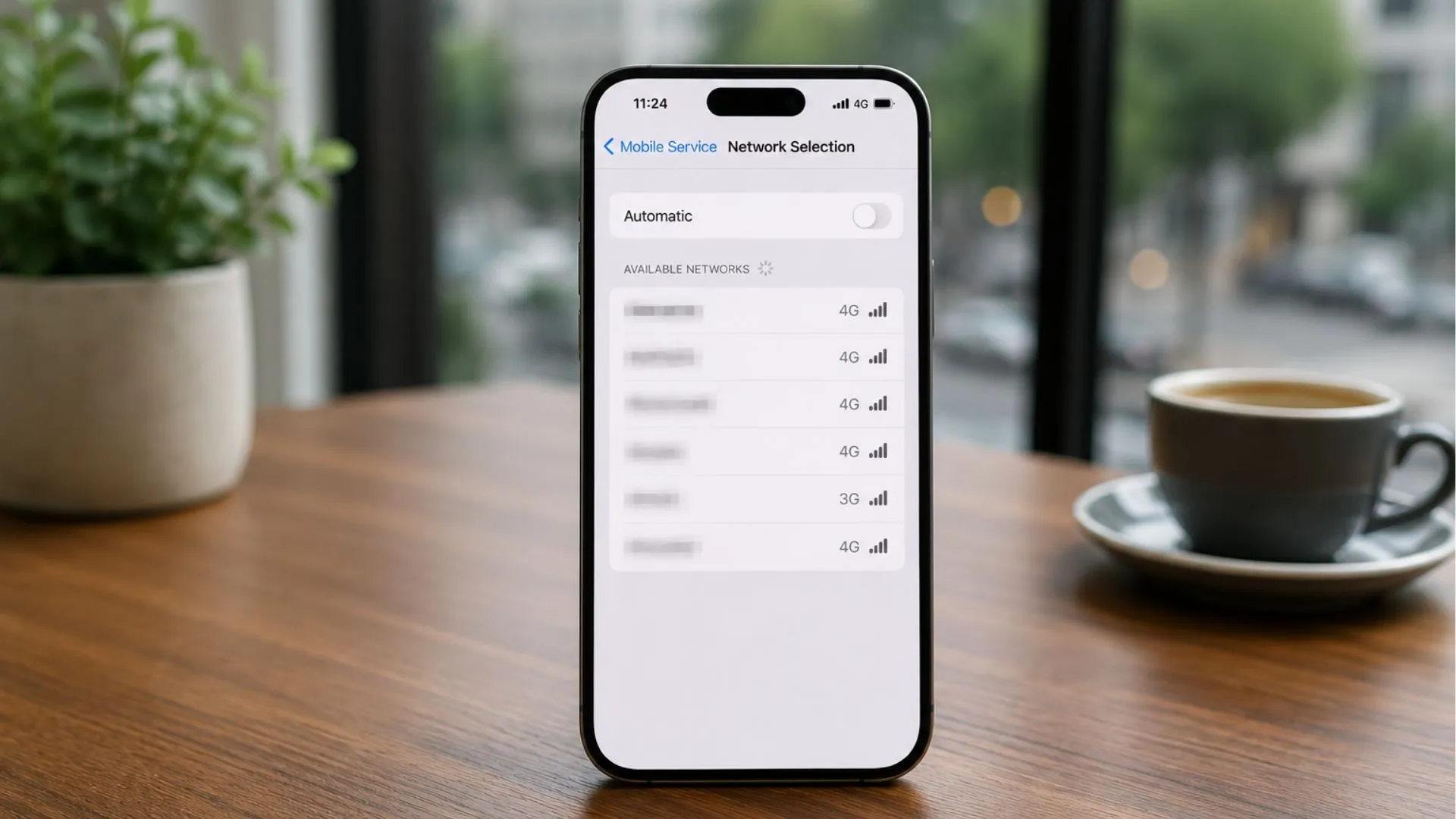
Manually selecting a network is often the fastest fix when automatic search gets stuck
Before assuming the worst, run through this checklist. It solves the majority of no service situations, including how to fix no service on a TM SIM or any other carrier’s SIM, in under five minutes.
- Toggle Airplane Mode. Turn it on, wait ten seconds, then turn it off. This forces your phone to search for networks fresh.
- Restart your phone. A simple reboot clears temporary network registration glitches more often than people expect.
- Check for a physical SIM issue. Remove the tray, wipe the SIM contacts gently, and reseat it.
- Manually select a network. In Settings, turn off automatic network selection and pick a local carrier manually. This can bypass a stuck automatic search.
- Confirm roaming is enabled. Check Settings under Mobile Data or Cellular to make sure Data Roaming is switched on if you are abroad.
- Reset network settings. This clears saved network preferences that may be corrupted, though it also removes saved WiFi passwords.
- Check your carrier account. Log in via WiFi to confirm your plan is active and roaming is included, not just domestic coverage.
If you are on eSIM and these steps do not help, the fix is often a manual toggle in your carrier settings rather than a network problem. Our eSIM activation not working manual toggle fix guide walks through the exact settings path, and Android users specifically should check Android eSIM no service fix for device-specific steps.
When Does No Service Mean Something Bigger Is Going On?
Sometimes no service is a signal, no pun intended, of a deeper issue rather than a quick glitch.
Why Does It Happen Suddenly at Home?
If your phone worked fine and suddenly shows no service at home, it is usually one of three things: a local tower outage (check your carrier’s status page or social media for reports), a billing issue that suspended your line, or a software update that reset network settings. Carrier outages tend to resolve within hours, so patience combined with an airplane mode toggle is often the right move.
Why Does It Happen After an iOS Update?
Apple occasionally ships carrier settings updates alongside iOS updates that can temporarily disrupt network registration. If no service appeared right after updating, go to Settings, General, About, and check if a carrier settings update is available and pending. Installing it usually resolves the issue within a few minutes.
Is a No Service Error Actually Bad for Your Phone?
No service on its own does not damage your phone or account. It is a connectivity state, not a hardware fault, and does not indicate anything is broken permanently. That said, if it persists for days without any of the fixes above working, it is worth contacting your carrier directly since it could indicate an account-level block.
If your phone consistently drops signal specifically when traveling, it is worth reading about whether eSIM technology tackles these connectivity issues more reliably than relying on your home carrier’s roaming agreements.
Avoid Costly Roaming Coverage Gaps
Switch to a local network built for your destination instead of relying on roaming.
How Voye Global eSIM Helps You Avoid This Abroad
The root cause of most travel no-service problems is roaming, meaning your home carrier simply has no agreement with a local network in that country. Rather than troubleshoot roaming settings from a foreign airport, many travelers now install a local eSIM before departure so their phone registers directly with a strong local network from the moment they land.
An eSIM plan from Voye Global connects you to established local networks in over 130 countries, activated digitally before you even board your flight, so there is no physical SIM to lose, damage, or forget to swap. It is a practical way to sidestep roaming gaps entirely rather than debug them mid-trip. Browse the full range of eSIM plans to find coverage for your next destination.
If you travel often and want to understand how eSIM compares to a physical SIM for reliability, eSIM vs Nano SIM key differences breaks down the practical differences travelers actually notice, including signal registration and setup speed.
A Quick Pre-Trip Checklist
- Confirm your destination has eSIM or local SIM coverage before you fly
- Install and test your eSIM profile on WiFi before departure
- Save your carrier’s manual network settings as a backup
- Keep your home carrier’s roaming status visible in case you need it as a fallback
No service messages are frustrating, but they are rarely permanent, and now you know exactly what to check first.
Frequently Asked Questions
Full bars with no service usually means your phone sees a tower but cannot register on it, often due to roaming restrictions, a network outage, or an account issue. Toggle airplane mode or manually select a network to force a fresh registration attempt.
Start by toggling airplane mode, restarting your phone, and checking that your SIM is seated properly. Then verify data roaming is enabled and try manually selecting a network. Resetting network settings clears most stubborn cases.
This is often a local carrier outage, a billing or account issue, or a software update that reset your network settings. Check your carrier’s outage status and toggle airplane mode before assuming a hardware fault.
iPhones sometimes lose service after a pending carrier settings update or iOS update. Go to Settings, General, About to check for and install a carrier update, which usually restores service within minutes.
No, a no service message does not damage your phone or account. It simply means the phone cannot register with a network at that moment. If it persists for days despite troubleshooting, contact your carrier to check for account-level blocks.
iOS updates sometimes ship alongside carrier settings changes that temporarily disrupt network registration. Restarting your phone and installing any pending carrier settings update from Settings usually resolves this within a few minutes.
Yes, a damaged, dirty, misaligned, or deactivated SIM can all cause no service. Reseating the SIM, cleaning the contacts, and confirming your plan and roaming are active with your carrier solves most SIM-related cases.
This points to a local coverage gap rather than a broken phone or SIM. Weak tower density, building materials like concrete and metal, and network handoff failures between towers all cause the signal to drop in specific spots.

Seamless Mobile Data Everywhere















 English